
JavaScript closures are one of the most powerful and important concepts in the language, yet they often confuse beginners and even intermediate developers. Closures are not a special syntax or keyword—instead, they are a natural result of how JavaScript scopes and functions work.
In this article, you’ll learn what closures are, how they work, why they are useful, and real-world examples that make the concept easy to understand and apply in everyday development.
What Is a Closure in JavaScript?
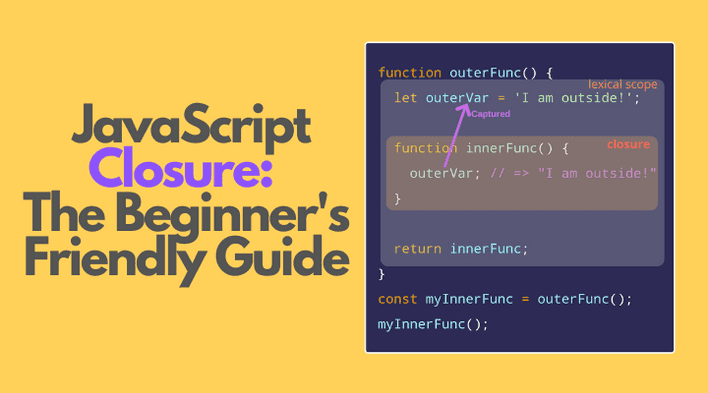
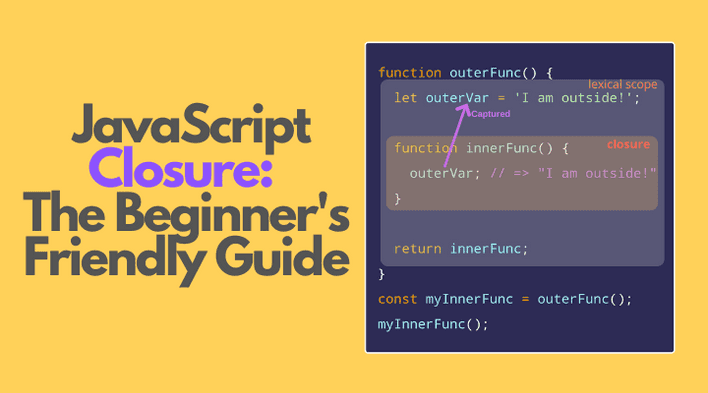
A closure is created when a function remembers and continues to access variables from its outer (lexical) scope, even after that outer function has finished executing.
In simple terms:
A closure allows a function to “remember” the variables that were in scope when it was created.
A Simple Closure Example
function outerFunction() {
  let message = "Hello from outer function";

  function innerFunction() {
    console.log(message);
  }

  return innerFunction;
}

const myClosure = outerFunction();
myClosure(); // Hello from outer function
What’s happening here?
outerFunction()runs and defines a variablemessageinnerFunction()usesmessageouterFunction()finishes executioninnerFunction()is still able to accessmessage
This is a closure.
Why Closures Work (Lexical Scope)
JavaScript uses lexical scoping, meaning:
- Scope is determined by where code is written, not where it’s executed
- Inner functions have access to variables of their parent functions
Because of this, JavaScript keeps the outer variables alive in memory as long as the inner function exists.
Closure in Real-Life Terms
Think of a closure like a backpack:
- A function carries a backpack
- Inside the backpack are variables from its outer scope
- Even when the outer function is gone, the backpack remains
Real Example 1: Private Variables
Closures are commonly used to hide data and create private variables.
function counter() {
  let count = 0;

  return function () {
    count++;
    return count;
  };
}

const increment = counter();

increment(); // 1
increment(); // 2
increment(); // 3
Why this is useful
countcannot be accessed directly- It can only be modified through the returned function
- This mimics encapsulation
Real Example 2: Function Factory
Closures allow you to create customized functions.
function multiplyBy(multiplier) {
  return function (number) {
    return number * multiplier;
  };
}

const double = multiplyBy(2);
const triple = multiplyBy(3);

double(5); // 10
triple(5); // 15
Each returned function remembers its own multiplier.
Real Example 3: setTimeout and Closures
Closures often appear with asynchronous code.
function delayedMessage(message, delay) {
  setTimeout(function () {
    console.log(message);
  }, delay);
}

delayedMessage("Hello after 2 seconds", 2000);
Even though delayedMessage finishes execution, the callback still remembers message.
Common Interview Example (Classic Closure Trap)
for (var i = 1; i <= 3; i++) {
  setTimeout(function () {
    console.log(i);
  }, 1000);
}
Output:
4
4
4
Why?
varis function-scoped- All callbacks share the same
i
Fix Using let
for (let i = 1; i <= 3; i++) {
  setTimeout(function () {
    console.log(i);
  }, 1000);
}
Output:
1
2
3
Each iteration creates a new block scope—each closure gets its own i.
Real Example 4: Event Handlers
Closures are heavily used in DOM events.
function attachHandler(buttonId) {
  const button = document.getElementById(buttonId);

  button.addEventListener("click", function () {
    console.log("Clicked:", buttonId);
  });
}

attachHandler("saveBtn");
attachHandler("deleteBtn");
Each handler remembers its own buttonId.
Where Closures Are Used in Real Projects
Closures are used in:
- Event listeners
- React hooks (
useState,useEffect) - Redux middleware
- Debounce & throttle functions
- Data privacy patterns
- Callbacks & async logic
Closures in React (Quick Insight)
function Counter() {
  const [count, setCount] = React.useState(0);

  function increment() {
    setCount(count + 1);
  }

  return <button onClick={increment}>{count}</button>;
}
The increment function forms a closure over count.
Common Mistakes Developers Make
- Thinking closures copy values (they reference variables)
- Accidentally creating memory leaks
- Misusing closures inside loops
- Overcomplicating simple logic
Performance and Memory Considerations
Closures keep variables in memory:
- Useful when needed
- Dangerous if overused improperly
Avoid:
- Long-lived closures holding large objects
- Unnecessary nested functions
Frequently Asked Questions
Are closures bad for performance?
No, when used correctly. Problems arise only when misused.
Are closures unique to JavaScript?
No, but JavaScript relies on them heavily.
Do all functions create closures?
Yes—every function in JavaScript forms a closure over its scope.
How to Know You Understand Closures
You understand closures if you can:
- Predict output in async examples
- Use them to create private variables
- Debug scope-related bugs confidently
Final Thoughts
Closures are not magic—they are a fundamental feature of JavaScript’s design. Once understood, they unlock powerful patterns and help you write cleaner, more maintainable code.
Mastering closures will make you:
- A better JavaScript developer
- Stronger in interviews
- More confident with advanced concepts like async and React hooks