
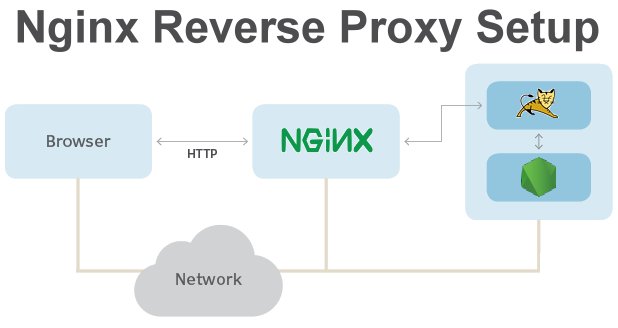
Nginx is one of the most widely used web servers and is especially popular for its role as a reverse proxy. In modern web architectures, Nginx often sits in front of applications to handle traffic routing, security, performance optimization, and load balancing.
This article explains how Nginx works as a reverse proxy, why developers use it, how requests flow through it, and real-world use cases—all explained in simple, practical terms.
What Is a Reverse Proxy?
A reverse proxy is a server that sits between clients and backend servers. Instead of clients connecting directly to an application server, they connect to the reverse proxy, which then forwards requests to one or more backend services.
From the client’s perspective:
The reverse proxy is the server
Backend services remain hidden
Nginx is one of the most popular tools used to implement a reverse proxy.
What Is Nginx?
Nginx is a high-performance web server, reverse proxy, and load balancer designed to handle large numbers of concurrent connections efficiently. It is commonly used to:
Serve static files
Proxy requests to backend applications
Load balance traffic
Terminate SSL/TLS (HTTPS)
Its event-driven, non-blocking architecture makes it ideal for modern web applications.
How Nginx Works as a Reverse Proxy
At a high level, Nginx receives incoming requests from clients and forwards them to backend servers based on predefined rules.
Request Flow Explained
A client sends a request to a domain (for example,
example.com)The request reaches Nginx
Nginx analyzes the request (path, headers, host)
Nginx forwards the request to the appropriate backend service
The backend processes the request and returns a response
Nginx sends the response back to the client
The client never communicates directly with the backend server.
Basic Nginx Reverse Proxy Configuration
Below is a simple example of Nginx acting as a reverse proxy for a backend application running on port 3000.
What This Configuration Does
Listens for incoming HTTP requests on port 80
Forwards all requests to a backend app running on
localhost:3000Passes important client headers to the backend
Why Developers Use Nginx as a Reverse Proxy
1. Security
Nginx hides backend servers from direct internet access. This reduces the attack surface and allows security rules to be enforced centrally.
2. SSL Termination
Nginx can handle HTTPS and SSL certificates, allowing backend applications to communicate over plain HTTP internally.
3. Performance
Nginx efficiently handles thousands of concurrent connections, reducing load on backend servers.
4. Centralized Traffic Control
Routing, redirects, caching, and rate limiting can all be managed in one place.
Nginx as a Reverse Proxy for Multiple Services
Nginx can route traffic to different backend services based on URL paths.
This setup is common in microservices architectures.
Reverse Proxy vs Forward Proxy
| Feature | Reverse Proxy | Forward Proxy |
|---|---|---|
| Used by | Server | Client |
| Hides | Backend servers | Client identity |
| Typical use | Load balancing, security | Content filtering, anonymity |
| Example | Nginx | Corporate proxy |
Load Balancing with Nginx
Nginx can distribute traffic across multiple backend servers.
This improves availability and scalability.
Common Headers Used in Reverse Proxying
When Nginx proxies requests, certain headers are important:
Host– original domain nameX-Real-IP– client’s IP addressX-Forwarded-For– chain of proxy IPsX-Forwarded-Proto– HTTP or HTTPS
These headers allow backend applications to understand the original request context.
Nginx Reverse Proxy with HTTPS
Nginx commonly handles SSL termination.
This allows backend services to remain simple while still serving secure traffic.
Common Use Cases
Frontend + backend separation
Microservices routing
API gateways
SSL termination
Legacy app modernization
Docker and Kubernetes ingress
Common Mistakes Developers Make
Forgetting to pass required headers
Misconfigured
proxy_passtrailing slashesNot handling WebSocket connections
Missing timeout settings
Improper HTTPS redirects
Nginx vs Other Reverse Proxies
| Tool | Strength |
|---|---|
| Nginx | High performance, flexibility |
| Apache | Simplicity, .htaccess support |
| Traefik | Dynamic container environments |
| Cloudflare | Managed edge proxy |
Nginx remains a top choice for self-hosted environments.
When Should You Use Nginx as a Reverse Proxy?
Use Nginx if:
You self-host applications
You need SSL termination
You run multiple services on one server
You want control over routing and performance
Final Thoughts
Nginx as a reverse proxy is a foundational component of modern web infrastructure. It improves security, scalability, and performance while simplifying backend application design.
Understanding how Nginx works as a reverse proxy helps developers build reliable, production-ready systems that scale with confidence.